Life with DOS 3.3
The Disk II drive of 1978 is what turned the Apple II from a home computer
that loaded its programs from cassettes into one people could work with: a
5¼ inch diskette held more than a hundred kilobytes, and a file was found on
it in seconds. The drive came with a disk operating system, DOS, that hid itself inside BASIC and
added commands to it: CATALOG, LOAD, SAVE, RUN, INIT. DOS 3.3, of
1980, fitted sixteen sectors on a track where DOS 3.2 had fitted thirteen,
140 KB on a diskette, and was the DOS of the Apple II from then on.
Every drive came with a System Master diskette, the one to start the machine with. This page starts an Apple ][+ with two drives from it, looks at what is on it, and makes a diskette of your own, which then starts the machine by itself.
What you need
DOS 3.3 System Master - 680-0210-A (1982).dsk, the DOS 3.3 System Master of January 1983, Apple’s part number 680-0210-A, on the Asimov archive.my-disk.dsk, a blank diskette: a file of 143,360 zero bytes, 35 tracks of 16 sectors of 256 bytes. DOS formats it, so nothing has to be on it.
./fetch-disks.sh, in this repository, downloads the first into the folder
disks, checks it, and makes disks/blank.dsk, the blank one. Copy the blank
one to have a diskette of your own to write on, and keep blank.dsk blank:
./fetch-disks.sh
cp disks/blank.dsk my-disk.dsk
Without the script, this makes the blank diskette on a Mac or on Linux:
head -c 143360 /dev/zero > my-disk.dsk
izapple2 writes what DOS saves straight into my-disk.dsk.
The DOS Manual of DOS 3.3 is on the Internet Archive.
The machine
An Apple ][+ with two disk drives:
- the 6502 processor at 1 MHz, 48 KB of memory, and Applesoft BASIC in its ROM;
- the keyboard of the ][+, which types only capitals;
- a 16 KB Language Card in slot 0, where the System Master loads Integer BASIC;
- a Disk II controller card in slot 6, with two drives: the System Master in drive 1 and your blank diskette in drive 2.
izapple2 -model none -board 2plus -cpu 6502 -screen green \
    -rom "<internal>/Apple2_Plus.rom" \
    -charrom "<internal>/Apple2rev7CharGen.rom" -forceCaps \
    -s0 language \
    -s6 'diskii,disk1=disks/DOS 3.3 System Master - 680-0210-A (1982).dsk,disk2=my-disk.dsk'
At the end, the same machine with your diskette alone, in drive 1:
izapple2 -model none -board 2plus -cpu 6502 -screen green \
    -rom "<internal>/Apple2_Plus.rom" \
    -charrom "<internal>/Apple2rev7CharGen.rom" -forceCaps \
    -s0 language \
    -s6 diskii,disk1=my-disk.dsk
The model 2plus of izapple2 has this machine, with a Videx Videoterm 80
column card more:
izapple2 -model 2plus -screen green "disks/DOS 3.3 System Master - 680-0210-A (1982).dsk" my-disk.dsk
izapple2 -model 2plus -screen green my-disk.dsk
Start the System Master
-
Start izapple2 with the first command. The machine starts from drive 1: it writes
APPLE ][at the top of the screen and the drive reads DOS into memory. Then the greeting of the System Master comes up, and it tells you it is loading Integer BASIC, the BASIC of the first Apple II, into memory, so that the programs written in it run on an Apple ][+ too.
What is on the diskette
-
Type
HOMEandCATALOG, each with Return. DOS lists the files of the diskette in drive 1, a screen at a time; press any key for the rest.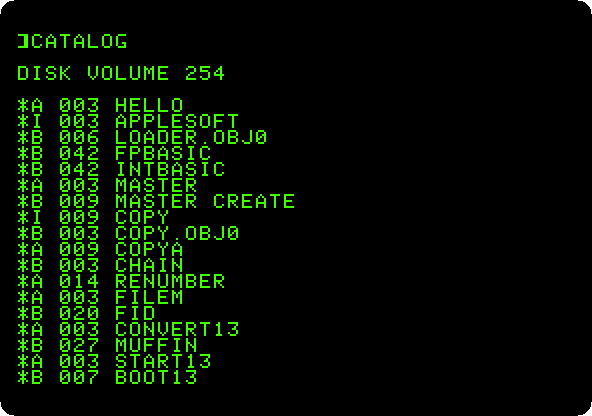
The letter before each name is what the file is:
Aan Applesoft program,Ian Integer BASIC one,Bbinary, machine code or data loaded into memory as it is, andTtext. The number is its size in sectors of 256 bytes. The*says the file is locked, and can’t be changed or deleted until it is unlocked withUNLOCK. -
Type
LOAD HELLO,HOME, andLIST 10,100.HELLOis the program DOS runs when it starts from this diskette, the one that wrote the greeting.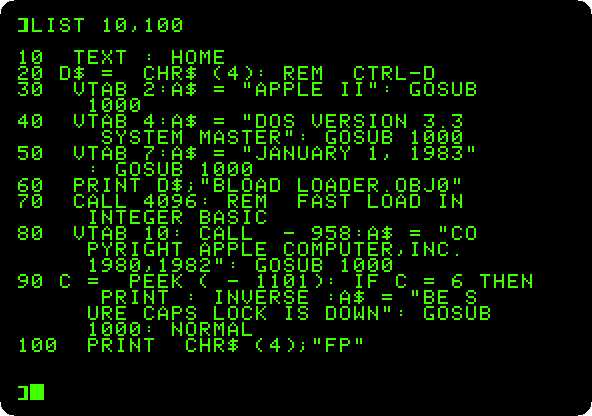
Line 20 is how a program talks to DOS:
CHR$(4)is Control-D, and a line printed after it is a DOS command and not text for the screen. Line 60 loads a machine code program, and line 70 calls it to load Integer BASIC faster than DOS would. Line 100 ends withFP, the DOS command that starts Applesoft.
A diskette of your own
-
Type a new program, and
INIT HELLO,D2:NEW HOME 10 PRINT "THIS IS ADA'S DISK" 20 PRINT "MADE ON AN APPLE ][+" INIT HELLO,D2INITformats the diskette in drive 2,D2, wiping it, writes DOS on it, and saves the program in memory on it asHELLO, the program the new diskette runs when it starts. The drive works for a while, with nothing on the screen, and gives back the prompt when it is done. -
Type
CATALOG,D2. The new diskette has one file, the greeting, two sectors long. DOS itself does not show: it is in the first three tracks, out of the way of the files.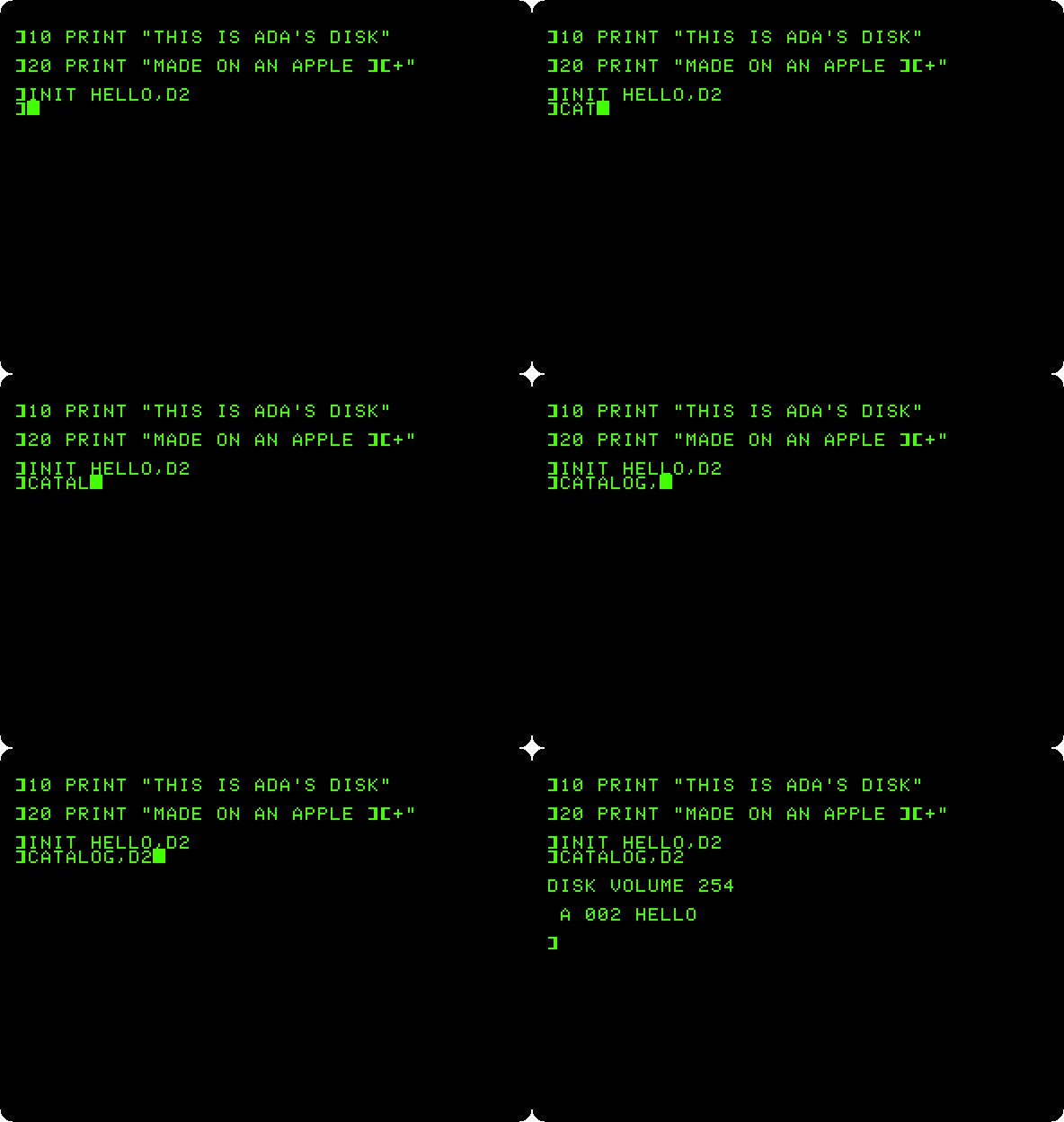
SAVEandLOADkeep and bring back more programs on it, by name, and,D1and,D2say which drive, which stays the one used until another is named. -
Close izapple2, and start it with your diskette alone, with the second command. The machine starts from your diskette, loads its DOS and runs its
HELLO.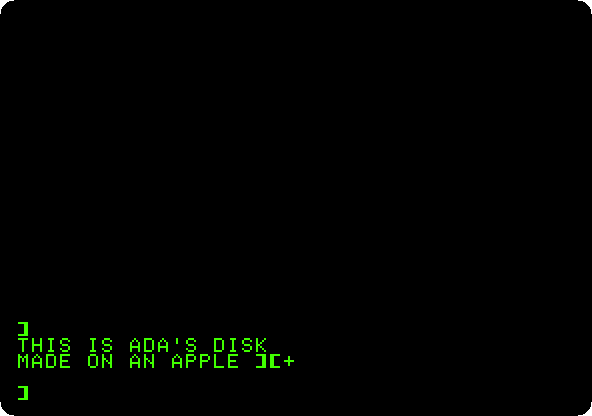
What next
Switch on an Apple ][+ has more on Applesoft, the BASIC these programs are written in.