The Apple ][ of 1977
The first Apple ][ came out in 1977, Steve Wozniak’s design from the board to the ROM. What the ROM had was his too: the Monitor, a few commands to look at the memory, change it and run what is in it, a disassembler, and a Mini-Assembler to write machine code a line at a time; and Integer BASIC, a BASIC that counted only in whole numbers, and was fast for it, with commands for the colour graphics of the machine. Applesoft, with floating point, took its place in the ROM of the Apple ][+ of 1979.
This page switches that machine on and goes through all three.
What you need
Only izapple2: the ROM of the Apple ][ comes inside it.
The Apple II Reference Manual of January 1978, the “Red Book”, is on the Internet Archive.
The machine
The first Apple ][, as it came:
- the 6502 processor at 1 MHz and 48 KB of memory;
- the ROM with Integer BASIC, the Monitor and the Mini-Assembler;
- the board of the first Apple ][s, with four colours in the high resolution graphics, and a keyboard of capitals only;
- no cards in its slots.
izapple2 -model none -board 2plus -cpu 6502 -screen green \
    -rom "<internal>/341-000x_integer.rom" \
    -charrom "<internal>/Apple2rev7CharGen.rom" -forceCaps \
    -mods four-colors
The model 2 of izapple2 is this same machine:
izapple2 -model 2 -screen green
The Monitor
-
Start izapple2 with the command above. The machine starts in the Monitor, with its prompt,
*, at the bottom of a screen full of@: the Apple ][ does not clear the screen when it starts, and the memory izapple2 gives it is all zeros, which the screen shows as inverse@. A real machine showed whatever its memory happened to hold.![The Apple ][ switched on](/guides/images/apple-ii/switched-on.png)
-
Press Escape and then @ to clear the screen, and type
F800.F807and Return: the Monitor shows the eight bytes from addressF800, in hexadecimal, the first bytes of the Monitor itself:F800- 4A 08 20 47 F8 28 A9 0F -
Type
F800L. The Monitor disassembles twenty instructions fromF800: the address, the bytes, and the instruction of the 6502 they are.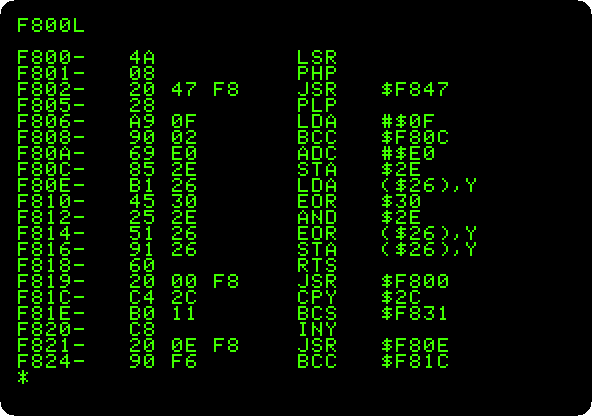
The Mini-Assembler
-
Clear the screen, type
F666G, and then the program below, a line at a time.F666Gruns the Mini-Assembler, which is at that address of the ROM, and its prompt is!. The first line says where the program goes,300; the next ones start with a space and go after the one before.$FF69Ggoes back to the Monitor, and300Gruns the program.F666G 300:LDA #C1 JSR FDED CLC ADC #1 CMP #DB BNE 302 RTS $FF69G 300G
The program writes the alphabet: it starts with the code of
A,C1, calls the routine of the Monitor that writes a character on the screen,FDED, adds one, and goes back until it gets pastZ. The Mini-Assembler writes each line again as it understands it, with the bytes it made.
Integer BASIC
-
Press Control-B and Return. The prompt of Integer BASIC is
>. Type these, each with Return;CALL -936clears the screen, by calling the routine of the Monitor that does it:CALL -936 10 PRINT "HELLO" 20 GOTO 10 LIST PRINT 7/2 PRINT 32767+1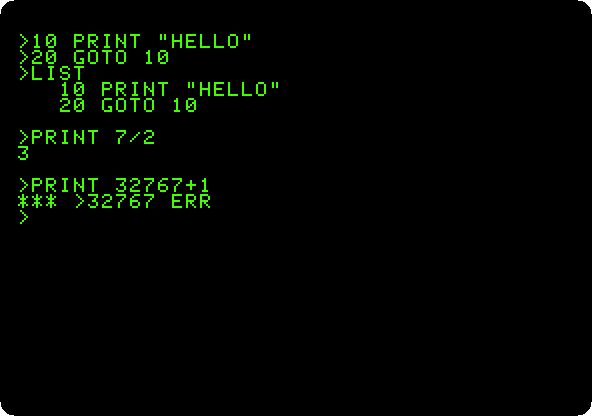
Seven halves are 3: there are no fractions in Integer BASIC. And there is nothing past 32767, the largest number of sixteen bits with a sign.
-
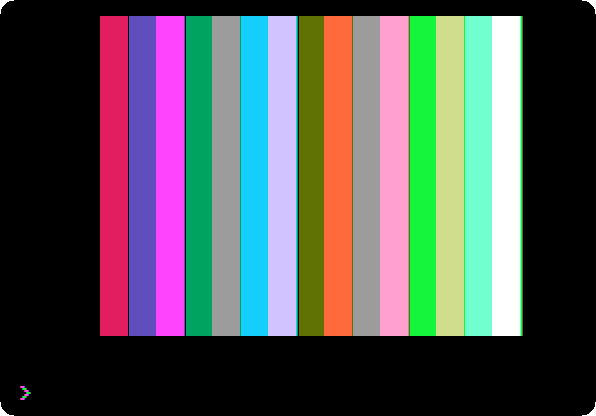
Draw the sixteen colours of the low resolution graphics, a bar of each:
NEW
CALL -936
10 GR
20 FOR I=0 TO 15
30 COLOR=I
40 VLIN 0,39 AT I*2+4
50 VLIN 0,39 AT I*2+5
60 NEXT I
70 END
RUN
Press F6 in izapple2 until the screen is in colour. The first bar is black, colour 0, and can’t be seen.
What next
Switch on an Apple ][+ is the machine two years later, with Applesoft in place of Integer BASIC.