A megabyte on a card: the Apple II Memory Expansion Card
The 6502 sees 64 KB, and an Apple ][+ with a Language Card has all of them. More memory had to be reached another way. Apple’s Memory Expansion Card, whose manual is of 1985, went in a slot of an Apple ][, ][+ or //e with 256 KB, and could be filled up to a megabyte. It did not add to the memory the processor sees: the card is read and written a byte at a time through four addresses of its slot, and its ROM makes of it a disk, a RAM disk, as fast as memory and as forgetful, empty again when the Apple is switched off. Programs like AppleWorks could be copied to it, to run without waiting for the drive.
This page puts a card of a megabyte in an Apple ][+, finds it as a disk of ProDOS, copies a file to it and times loading it from both, runs the test in the ROM of the card, tries to start up from it, and uses it from DOS 3.3.
What you need
ProDOS_2_4_3.po, ProDOS 2.4.3, from its page;DOS 3.3 System Master - 680-0210-A (1982).dsk, Apple’s DOS 3.3 System Master, on the Asimov archive.
./fetch-disks.sh in this repository downloads them into disks/ and checks
them. The ROM of the card comes inside izapple2.
The manual of the Apple II Memory Expansion Card, of 1985, is on apple-iigs.info.
The machine
An Apple ][+ with a megabyte more:
- the 6502 processor at 1 MHz and 64 KB of memory: 48 KB on the board, and 16 KB of a language card, which izapple2 puts in slot 0;
- the Apple II Memory Expansion Card in slot 4, with 1 MB;
- a Disk II controller card in slot 6, with ProDOS in drive 1.
izapple2 -model none -board 2plus -cpu 6502 -screen green \
    -rom "<internal>/Apple2_Plus.rom" \
    -charrom "<internal>/Apple2rev7CharGen.rom" -forceCaps \
    -s0 language \
    -s4 memexp \
    -s6 diskii,disk1=disks/ProDOS_2_4_3.po
The same machine with DOS 3.3:
izapple2 -model none -board 2plus -cpu 6502 -screen green \
    -rom "<internal>/Apple2_Plus.rom" \
    -charrom "<internal>/Apple2rev7CharGen.rom" -forceCaps \
    -s0 language \
    -s4 memexp \
    -s6 'diskii,disk1=disks/DOS 3.3 System Master - 680-0210-A (1982).dsk'
memexp,size=256 gives the card as it was sold, with 256 KB; 512 and 768
are the sizes in between.
A disk of memory
-
Start izapple2 with the first command. ProDOS starts Bitsy Bye; press Tab, which goes to the next disk.
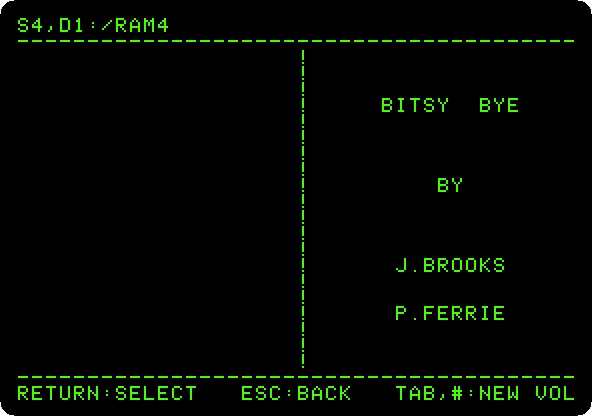
S4,D1:/RAM4, slot 4, drive 1: the card made itself a disk of ProDOS the first time it was used, named for its slot, and empty. -
Press Tab to go back to the diskette, the down arrow three times to
BASIC.SYSTEM, and Return. Then type:CAT /RAM4 BLOAD PRODOS,TSYS,A$2000 CREATE /RAM4/PRODOS,TSYS BSAVE /RAM4/PRODOS,TSYS,A$2000,L17128 CAT /RAM4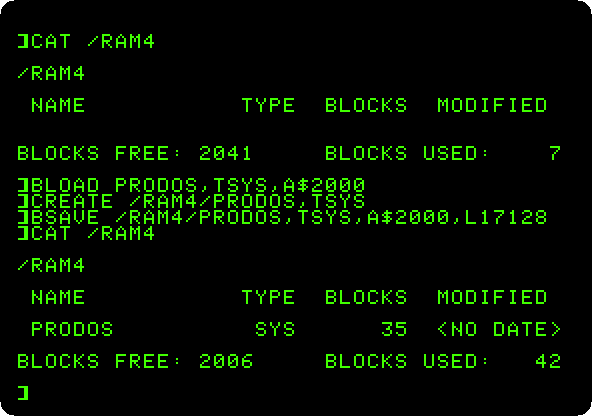
2,048 blocks of 512 bytes, the megabyte.
BLOADloads the filePRODOSinto memory from$2000, andBSAVEwrites its 17,128 bytes to the card; a file of the typeSYShas to be created first. -
Type
BLOAD /PRODOS.2.4.3/PRODOS,TSYS,A$2000, from the diskette, andBLOAD /RAM4/PRODOS,TSYS,A$2000, from the card. The first takes about three seconds, the drive turning; the second, a sixth of a second.
The test of the card
-
Type
CALL -151for the Monitor, andC40AG: the test in the ROM of the card, at$C40Afor a card in slot 4. It says how big the card is, and goes over it, a dot at a time, for three minutes a pass.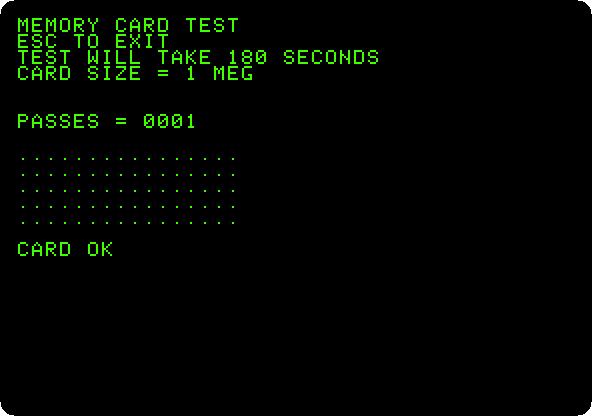
One pass, and
CARD OK. Press Escape to leave it.
Starting up from the card
-
Press Reset, Control-F2 in izapple2, and type
HOMEandPR#4, to start up from the card: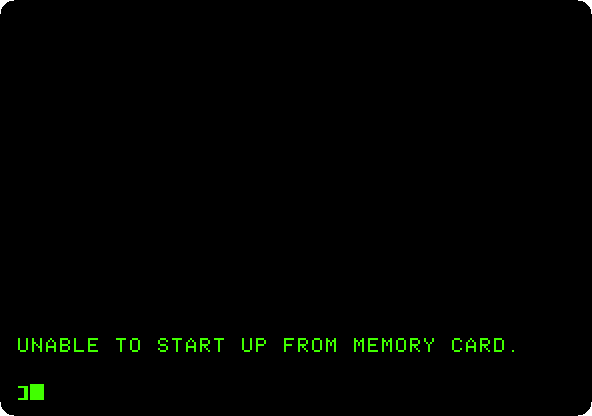
The card formats itself as a disk for data, not as a disk to start up from. Its manual tells how: format it with the formatter of ProDOS, which writes what a startup disk needs, and copy the programs to it.
With DOS 3.3
-
Quit izapple2 and start it with the second command. DOS 3.3 does not find the card by itself: type
IN#4, which formats it for DOS, as slot 4, drive 1. Type a program, save it on the card, catalog it and run it:IN#4 10 PRINT "SAVED ON THE CARD" SAVE NOTE,S4,D1 CATALOG,S4,D1 RUN NOTE,S4,D1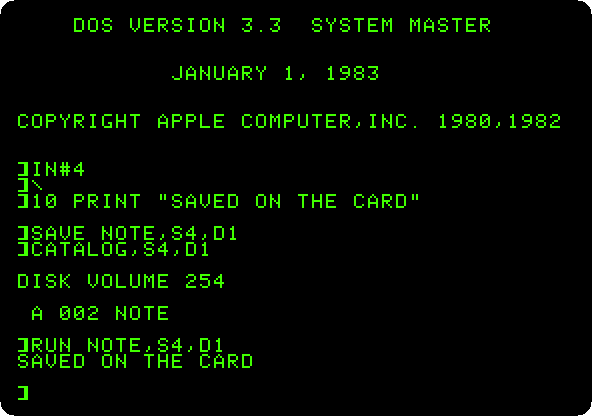
DOS 3.3 sees 400 KB of the card, as much as it can handle on a disk.
What next
ProDOS has another RAM disk, /RAM, in the extended 80 column
card of the //e, and AppleWorks is the program people
copied to the card.