The time from a ThunderClock
An Apple ][ did not know what time it was. It counted nothing while it was off, and when it was on it had no clock to read, so programs asked for the date, or did without, and the files of a diskette had none. A clock was a card, as the ThunderClock Plus, of Thunderware, Inc., whose manual is copyrighted 1980 and 1982: a clock chip, an NEC µPD1990AC, with batteries on the card that kept it running with the Apple off, and firmware in the ROM of the card to read it from BASIC.
ProDOS, in 1983, looked for a clock card when it started, and when it found one, it gave every file it saved the date and the time.
This page reads the time from BASIC, as the manual of the card shows, and saves a program with ProDOS, to see the date in the catalog.
What you need
ProDOS_2_4_3.po, ProDOS 2.4.3, from
its page. ./fetch-disks.sh in
this repository downloads it into disks/ and checks it. The program of the
page is also in this repository, listings/clock.bas.
The manual of the ThunderClock Plus, with the programs of this page, is on the Internet Archive.
The machine
An Apple ][+ with a clock:
- the 6502 processor at 1 MHz and 64 KB of memory: 48 KB on the board, and 16 KB of a language card, which izapple2 puts in slot 0, and which ProDOS needs;
- a ThunderClock Plus in slot 4; izapple2 gives it the time of the computer it runs on;
- a Disk II controller card in slot 6, with ProDOS in drive 1.
izapple2 -model none -board 2plus -cpu 6502 -screen green \
    -rom "<internal>/Apple2_Plus.rom" \
    -charrom "<internal>/Apple2rev7CharGen.rom" -forceCaps \
    -saveDir changes \
    -s0 language \
    -s4 thunderclock \
    -s6 diskii,disk1=disks/ProDOS_2_4_3.po
The page saves a program on the diskette of ProDOS. With -saveDir changes,
izapple2 keeps what is written in the folder changes, and leaves the file
of ProDOS as it was downloaded. Make the folder before starting izapple2:
mkdir changes.
The time in BASIC
-
Start izapple2 with the command above. ProDOS starts Bitsy Bye; press the down arrow three times, to
BASIC.SYSTEM, and Return. -
Type the program, from the manual of the card, with its slot, 4, and
RUNit:10 D$ = CHR$ (4) 20 PRINT D$;"PR#4": PRINT D$;"IN#4" 30 INPUT "%";T$: INPUT "&";U$ 40 PRINT D$;"PR#0": PRINT D$;"IN#0" 50 PRINT T$: PRINT U$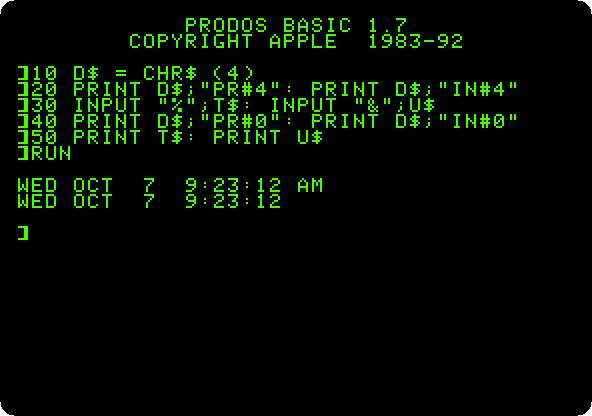
PR#4andIN#4send what BASIC prints to the card, and take what it reads from it; under ProDOS they are commands given after Control-D,CHR$(4). The prompt ofINPUTgoes to the card and tells it how to answer:%the time with AM or PM,&in 24 hours. A space gives it as numbers,10/07 09;21;50.000, in the format of the Apple Clock of Mountain Computer, another clock card, so that the programs written for that one worked with this one.PR#0andIN#0go back to the screen and the keyboard.The chip keeps the month, the day, the day of the week and the time, and not the year.
The date of a file
-
Type
SAVE CLOCKandCAT, the catalog of ProDOS that fits in 40 columns: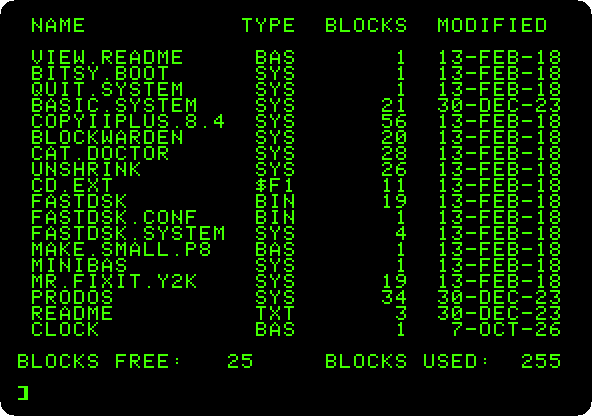
CLOCK, at the end, has today’s date: ProDOS read it from the card, and worked out the year itself. The other files have the dates they were given when ProDOS 2.4.3 was made.CATALOG, wider, has the time of each too. Without a clock, as on the page of ProDOS, the files saved have no date.The pictures of this page show the day and the time they were made at; yours will show yours.
What next
ProDOS goes on with ProDOS on the //e, and What is in the slots: Card Cat finds a ThunderClock in a slot among other cards.