The Apple //e, original and enhanced
The Apple //e lived for ten years, in three models that look alike:
- The Apple //e, of January 1983: small letters on its keyboard and its screen, 80 columns with a card in its auxiliary slot, the 6502 of the Apple ][.
- The enhanced //e, of March 1985: four chips changed, and an upgrade kit with the same four for the owners of a //e. The 65C02 processor, which has more instructions; the ROMs of Applesoft and of the Monitor, fixed and extended; and the ROM of the characters, with MouseText, 32 little pictures for the screens of text, which the //c of 1984 had brought. Its power light said Enhanced.
- The Platinum //e, of January 1987: the keyboard of the IIGS, with a numeric keypad on it. Apple made it until November 1993.
This page does the same things on the first two, side by side: switches them on, gives Applesoft a command in small letters, prints the characters that became MouseText, and asks the Monitor for its Mini-Assembler. The pictures of the //e of 1983 are on the left, and say Apple //e of 1983 under the screen; those of the enhanced one are on the right, and say Enhanced Apple //e of 1985.
What you need
Only izapple2: the ROMs of both come inside it.
The manual of the Apple IIe Enhancement Kit, and the Apple IIe Technical Reference Manual of 1985, are on the Internet Archive.
The machine
The Apple //e of 1983:
- the 6502 processor at 1 MHz and 128 KB of memory: 64 KB on the board, the top 16 KB of it the memory of a language card, which izapple2 puts in slot 0, and 64 KB more on the extended 80 column card, in the auxiliary slot;
- its ROM, and its ROM of characters;
- no cards in its slots.
izapple2 -model none -board 2e -cpu 6502 -screen green \
    -rom "<internal>/Apple2e.rom" \
    -charrom "<internal>/Apple IIe Video Unenhanced.bin" \
    -s0 language
The enhanced //e, the same with the 65C02 and the ROMs of 1985:
izapple2 -model none -board 2e -cpu 65c02 -screen green \
    -rom "<internal>/Apple2e_Enhanced.rom" \
    -charrom "<internal>/Apple IIe Video Enhanced.bin" \
    -s0 language
The models 2e and 2enh of izapple2 are these two, with a Disk II
controller and DOS 3.3 more, and, 2enh, more cards. izapple2 has no model
of the Platinum //e.
Switched on
-
Start izapple2 with the first command, and type
print "hello"in small letters. Then quit izapple2, start it with the second command, and type the same.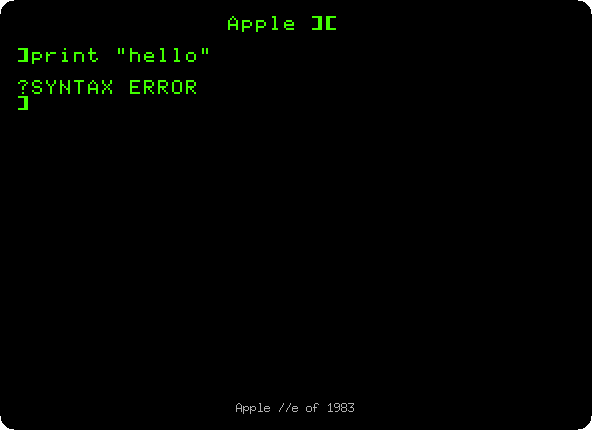
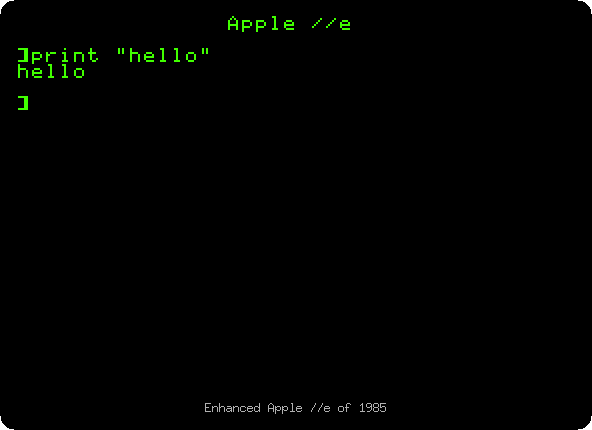
The first says
Apple ][when it starts, the secondApple //e: the way to tell them apart, as the manuals of the time said. The first does not knowprint, onlyPRINT; the enhanced one takes the commands of Applesoft in small letters too.
MouseText
-
Type
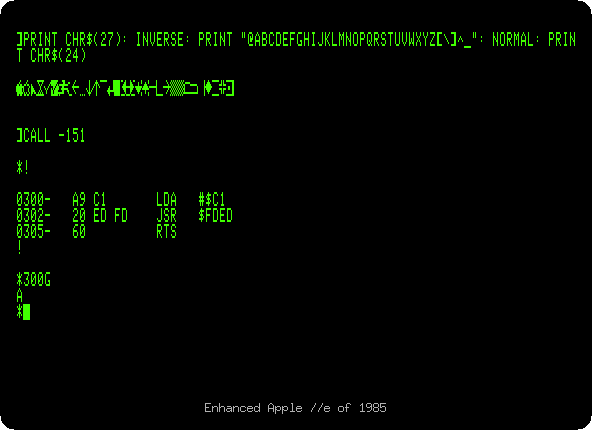
PR#3for 80 columns, and then this line, on both:PRINT CHR$(27): INVERSE: PRINT "@ABCDEFGHIJKLMNOPQRSTUVWXYZ[\]^_": NORMAL: PRINT CHR$(24)CHR$(27), Control-[, asks the 80 column firmware for MouseText, andCHR$(24), Control-X, ends it; between them the 32 characters from@to_, in inverse.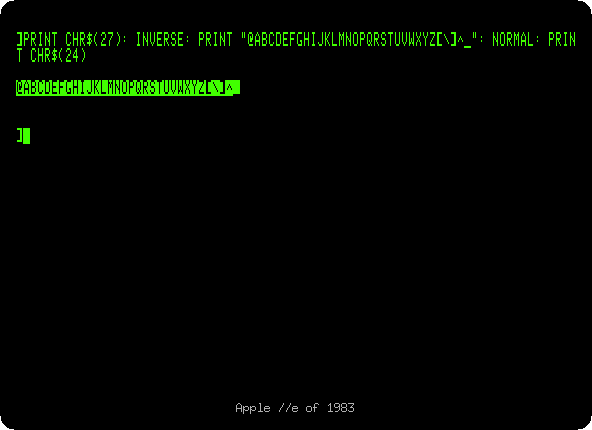
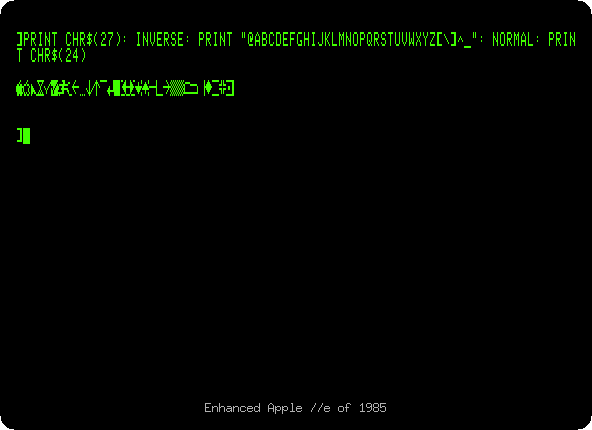
On the first, inverse capitals. On the enhanced one, MouseText: an apple, a pointer, an hourglass, a check mark, arrows, the pieces of windows and scroll bars. MouseText took the place of the flashing characters in 80 columns. Some older programs, which printed inverse capitals that way, showed MouseText instead until they were updated.
The Mini-Assembler
-
Type
CALL -151for the Monitor, and!, on both. On the enhanced one, the Mini-Assembler answers with its prompt,!. Type:300:LDA #$C1 JSR $FDED RTSan empty line to leave it, and
300Gto run the program, which prints anA, as on the Apple ][ of 1977.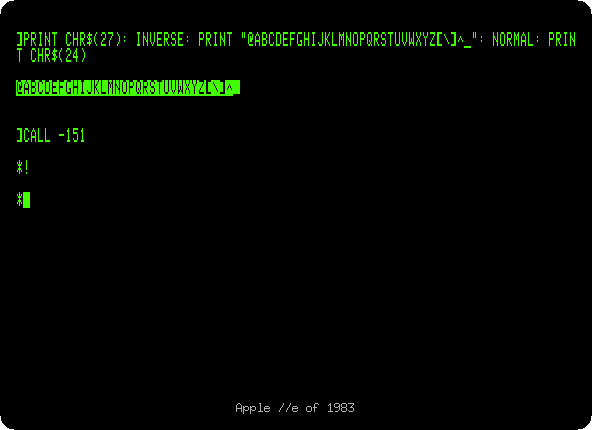
The Monitor of the //e of 1983 has no Mini-Assembler, and
!does nothing. It was in the ROM of the first Apple ][, with Integer BASIC, and left with it in the Apple ][+; the enhanced //e brought it back.
What next
Switch on an Apple //e goes on with the enhanced //e, its 80 columns and its self test, and Apple II DeskTop builds its windows of MouseText.