Printing on the Apple IIc
Activities › Making things and work
The Apple IIc had no slots for a printer card: its printer port was built
in, at the back, a serial port for Apple’s ImageWriter, the dot matrix
printer Apple sold from 1983. For the programs it is a card in slot 1, as on
the //e: BASIC sends its output to it with PR#1, and back to the screen
with PR#0.
This page prints from Applesoft a program and what it prints when it runs, and then a picture from MousePaint, dot by dot. izapple2 writes what the port sends to a file, and imagewriter2 draws the picture on paper, as the ImageWriter would.
What you need
077_MousePaint_Drawing_Program_68C-3005-A_1984.dsk, the diskette of
MousePaint, from the
Internet Archive.
./fetch-disks.sh in this repository downloads it into disks/.
imagewriter2, to see the picture printed, a program in Go that reads the codes of the ImageWriter and draws the paper as a GIF picture. It draws the graphics, not the letters, which are in the file as text.
The Apple IIc Owner’s Manual is on the Internet Archive.
The machine
The Apple IIc of 1984, with a printer that is a file:
- the 65C02 processor at 1 MHz and 128 KB of memory: 64 KB, the top 16 KB of it the memory of a language card, which izapple2 puts in slot 0 as for the //e, and 64 KB more where the //e has its extended 80 column card;
- its two serial ports, in slots 1 and 2 for the programs: the printer port,
with a printer that is a file,
printer.out, in the folder izapple2 runs in, and the modem port; - its port for the mouse, at the back, which its ROM gives to the programs as a mouse card in slot 4;
- its disk drive, on the disk port in slot 6, empty to start.
izapple2 -model none -board 2c -cpu 65c02 -screen green \
    -rom "<internal>/Apple2c_ROM255.rom" \
    -charrom "<internal>/Apple IIe Video Enhanced.bin" \
    -s0 language \
    -s1 iicserial,device=file,file=printer.out \
    -s2 iicserial \
    -s6 iicdisk
The model 2c_rom255 of izapple2 is this machine, with DOS 3.3 in its
drive:
izapple2 -model 2c_rom255 -screen green -s1 iicserial,device=file,file=printer.out
From Applesoft
-
Start izapple2 with the command above. The IIc says
Apple //cand waits for a diskette. Press Control-Reset, Control-F2 in izapple2, for Applesoft. -
Type the program, a line at a time. It is in listings/squares.bas too.
10 REM SQUARES
20 FOR I = 1 TO 10
30 PRINT I;" SQUARED IS ";I * I
40 NEXT I
Type
PR#1,LIST,RUNandPR#0, each with Return. The screen shows none of it afterPR#1: the printer port of the IIc sends the output to the printer only, untilPR#0.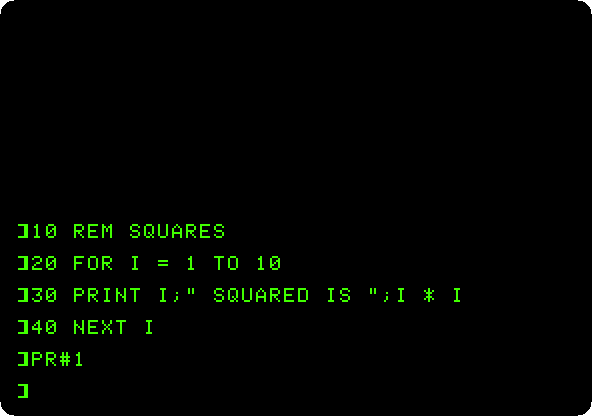
The port takes commands of its own, as Control-I and a letter. Control-I and
IafterPR#1shows the output on the screen as well, and Applesoft answers?SYNTAX ERRORto the line, as it is not BASIC.On the paper, what the IIc sent, as it came out of
printer.out:]LIST 10 REM SQUARES 20 FOR I = 1 TO 10 30 PRINT I;" SQUARED IS ";I * I 40 NEXT I ]RUN 1 SQUARED IS 1 2 SQUARED IS 4 3 SQUARED IS 9 4 SQUARED IS 16 5 SQUARED IS 25 6 SQUARED IS 36 7 SQUARED IS 49 8 SQUARED IS 64 9 SQUARED IS 81 10 SQUARED IS 100 ]PR#0The Apple sends its characters with the top bit set, as it keeps them in memory, and ends each line with a carriage return and a line feed. This turns
printer.outinto plain text on a Mac or on Linux:LC_ALL=C tr '\200-\377' '\000-\177' < printer.out | tr -d '\r'
From MousePaint
-
Drop
077_MousePaint_Drawing_Program_68C-3005-A_1984.dskon the area of drive 1 of the window of izapple2, and hold Open Apple, the left Alt or Option key, and press Control-Reset: the IIc starts MousePaint. Click the mouse for MousePaint itself, and move the pointer to the top left corner, where the pointer of MousePaint and the one of izapple2 meet. -
Choose Get picture… in the File menu, type
MOUSE.PICand Return: the picture of the AppleMouse on the diskette. Choose Print Picture in the File menu. MousePaint asks for the slot of the printer: type1and Return.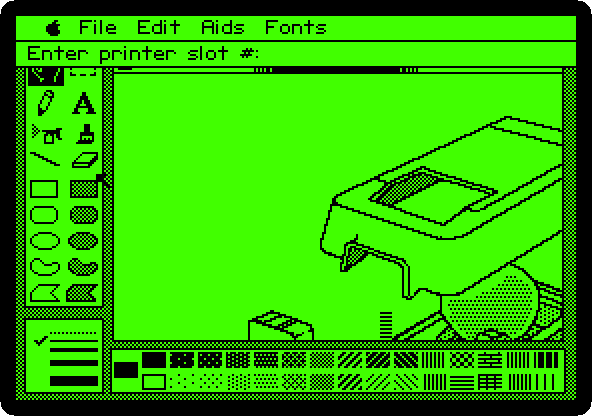
MousePaint sends the picture as graphics of the ImageWriter, a row of 8 dots high at a time, the whole page, 280 dots across at 72 an inch, almost four inches. imagewriter2 draws it:
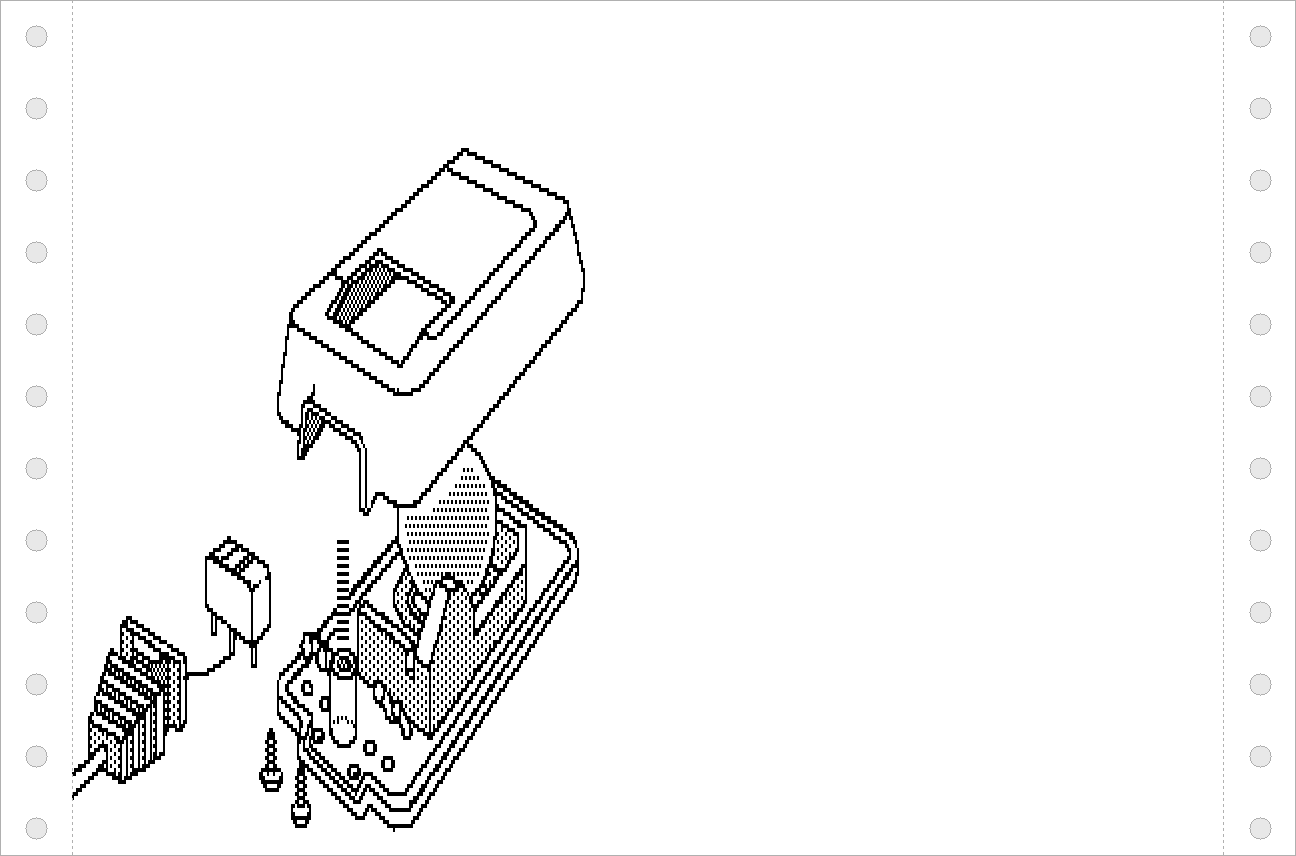
MousePaint sends the codes of the ImageWriter with the top bit set too,
ESCas $9B, and imagewriter2 reads them only without it. To drawprinter.out, the generator of this page, iicprinting_test.go, takes the top bit off the codes, and leaves the dots of the graphics as they are.
What next
Next: The Print Shop: cards, signs and banners.
Printing is the same on an Apple ][+ with a parallel card, MousePaint on the Apple IIc draws a picture to print, and Two Apple IIcs on the line uses the other port.